Computer Printer Parts and Accessories for Reliable Printing
Computer printer parts and accessories help keep home, office, and creative-workflow printers productive as components wear or printing needs change. Common replacement parts include pickup rollers, separation pads, trays, fuser units, maintenance kits, printheads, and waste-ink containers. Accessories such as extra paper cassettes, printer stands, covers, and cable adapters can improve setup and everyday use. Laser printers rely on imaging drums, transfer belts, and fusers, while inkjet models may need printheads, cartridges, or ink tanks. Choosing the correct component supports consistent paper feeding and output quality. Compare the printer's exact model number and part designation before ordering; similar-looking components may differ in dimensions, connector type, firmware support, or installation method. Ubuy offers a way to discover international printer parts and accessories across varied product types.
- Replacement components for common wear points
- Accessories for setup and paper capacity
- Model-number matching helps avoid fit issues
Ink, Toner, Printheads, and Other Printer Consumables
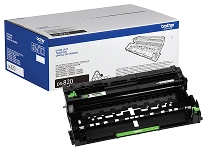
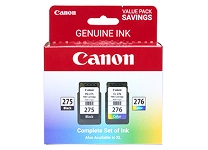
Printer consumables influence print quality, running routines, and how often supplies need replenishing. Inkjet users can compare standard and high-yield ink cartridges, refill bottles for tank printers, and replacement printheads where the design permits. Laser printer supplies include toner cartridges, imaging drums, and waste-toner containers; some models combine the toner and drum, while others use separate units. Original-equipment and compatible options may differ in formulation, page-yield claims, chip requirements, and printer recognition, so check the product description against the printer manual. Color printing also depends on the correct cyan, magenta, yellow, and black supplies, while monochrome models typically use black only. Store unopened cartridges as directed and avoid touching sensitive electrical contacts or drum surfaces. Brands such as HP, Epson, Canon, and Brother make printers with model-specific consumable requirements.
- Compare cartridge, toner, and ink-tank formats
- Check color, yield, and chip compatibility
- Handle drums and contacts with care
Paper Handling, Trays, and Print-Finishing Accessories
Paper-handling accessories help a printer manage different media and larger workloads. Additional input trays or paper cassettes can reduce the need to reload sheets, while multipurpose feeders are useful for envelopes, labels, and specialty paper when supported by the device. Output trays, stackers, and duplex units can support organized printing and two-sided jobs, but their fit and functions vary by model. Check supported paper sizes, weight ranges, and media types before selecting an accessory; a tray designed for standard office paper may not suit card stock or photo media. For business environments, finisher options can include stapling or hole-punching features on compatible printer systems. Keep rollers and feed paths clean, and load paper according to the printer's guides to reduce skewing and misfeeds. The right combination makes routine printing more convenient without exceeding the device's design limits.
- Expand input capacity with compatible trays
- Verify supported media sizes and weights
- Consider duplexing and finishing needs
Printer Connectivity, Cables, and Setup Accessories
Connectivity accessories make it easier to position and use a printer within a workstation or shared setup. Depending on the printer, useful items may include USB cables, Ethernet cables, wireless print adapters, print servers, and compatible power cords. Check the printer's available ports, network features, operating-system requirements, and supported connection standards before choosing an accessory. A USB connection can suit a nearby computer, while Ethernet may provide a wired network link for shared use; wireless functions depend on the printer and network configuration. Cable length, connector shape, and power specifications matter, and adapters cannot add functions that the printer hardware does not support. Stands, shelves, and protective covers can also help organize a workspace, provided they leave ventilation and access to paper paths unobstructed. Ubuy helps shoppers explore international options for printer accessories, with product details to review for fit and function.
- Match connectors and supported interfaces
- Check network and operating-system requirements
- Allow ventilation around the printer
Maintenance Kits, Replacement Parts, and Printer Care
Regular care can help maintain dependable printing and identify when a replacement part is needed. Maintenance kits may bundle components such as rollers, fusers, or transfer parts for specific laser printer models, while inkjet care can involve printhead cleaning routines and waste-ink maintenance. Follow the manufacturer's instructions for cleaning and replacement, and use only parts intended for the exact device. Repeated paper jams may point to worn pickup rollers, incorrect paper loading, or debris in the feed path; faded or streaked pages can have several causes, including low supplies or a dirty printhead. Turn off and unplug equipment when a repair procedure calls for it, and allow hot components such as fusers to cool. Keep a record of part numbers and service messages to make future selection easier. For complex repairs, consult the printer manual or a qualified service professional.
- Use model-specific maintenance kits
- Follow safe cleaning and replacement guidance
- Check symptoms before replacing components
Select the Right computer printer parts accessories
Start with the printer's brand, full model name, and, when available, serial or product number. Use these details to compare replacement part numbers, supported printer series, and installation requirements; do not rely on appearance alone. Next, identify the job the item must perform, whether replacing a worn roller, replenishing toner, adding paper capacity, or connecting the printer to a network. Compare material, dimensions, connector type, color, yield information, and any stated compatibility notes. Consider how frequently the printer is used, the media it handles, and whether the part is intended for home, office, or production equipment. Review included accessories and installation instructions so you know whether tools or additional components are needed. Ubuy provides a platform for discovering printer parts and accessories from international product selections. A careful model and specification check helps narrow choices and supports a more confident purchase.
- Confirm the exact printer model and part number
- Match specifications to the intended task
- Review installation details before purchase